Simplifying Maximum Mobil’s Growing Ecosystem
Improving discovery, card management, and everyday financial actions across a growing mobile wallet.
Context
Maximum Mobil had evolved beyond cards and payments into a broader ecosystem of campaigns, tickets, transportation, and financial services. As the product expanded, the experience became harder to navigate for both loyal İşbank customers and first-time users.
Problem
Critical services and card management actions were buried in deeper hierarchies. New users struggled to understand the product’s value, while existing customers could not quickly complete high-intent actions such as freezing or cancelling a lost card.
Vision
Create a clearer and more dynamic experience across Home, Wallet, and Card Details—helping users find essential actions faster, discover relevant services, and manage their finances with confidence.
Evidence / Problem Signals
Low feature discoverability
Users could not easily understand the full product value, especially when landing on a page filled with campaigns and ecosystem services.
Need
Research showed that the problem was not only visual freshness. Users had difficulty discovering important features, understanding the homepage, and accessing card management actions when they needed them most. CX reports also highlighted that users needed help finding card management features, navigating the homepage, and being informed about new features.
Key User Profile 1 Mehmet — New / Non-İş Bank User
Need
Understand what Maximum Mobil offers and whether it is useful without being an İşbank customer.Users could not easily understand the full product value, especially when landing on a page filled with campaigns and ecosystem services.
Manage cards, monitor transactions, and act quickly in financial security moments.
Timeline
Apr–Jul 2020
Insufficient information architecture
As the number of features increased, important business-critical services were pushed into deeper layers.
Emergency card actions such as freeze or lost/stolen card were hidden too deep in the card settings.
Critical card actions were hard to reach
Users in stressful moments, such as losing a card, struggled to find freeze or cancel actions quickly.
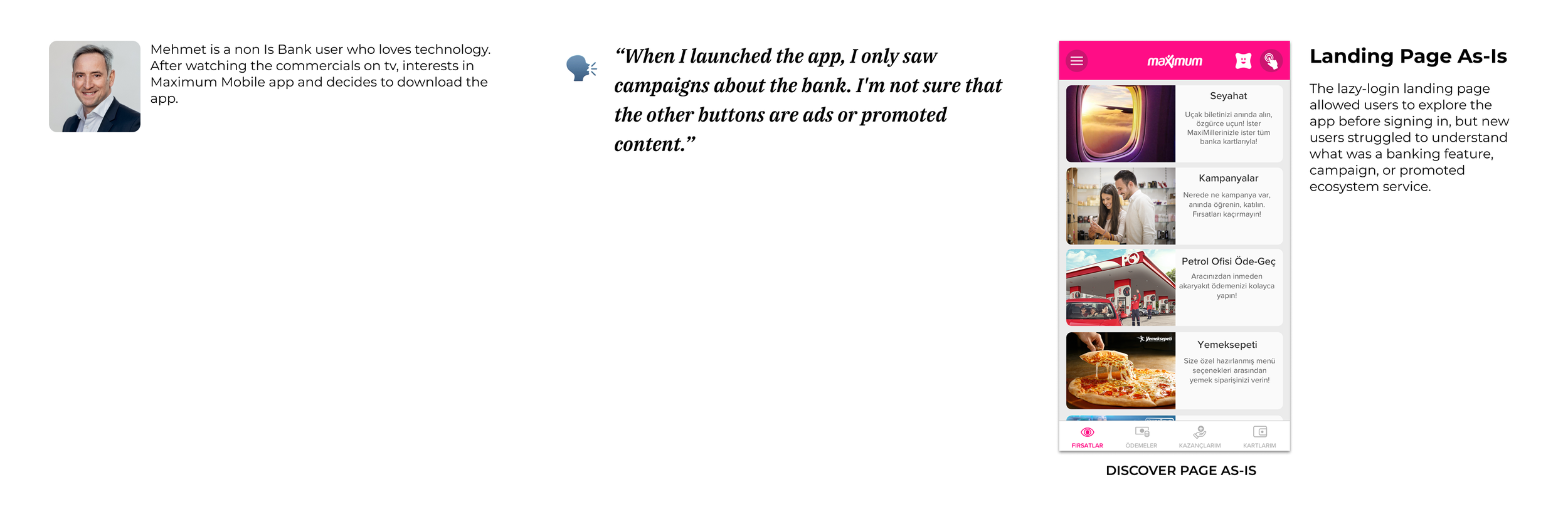
Friction
The landing page felt unclear, and secondary features looked like ads or promoted content.
Opportunity
Help new users discover the ecosystem, add their existing cards, or apply for an İşbank card.Understand what Maximum Mobil offers and whether it is useful without being an İşbank customer.Users could not easily understand the full product value, especially when landing on a page filled with campaigns and ecosystem services.
Key User Profile 2 Ayşe — Loyal İş Bank User
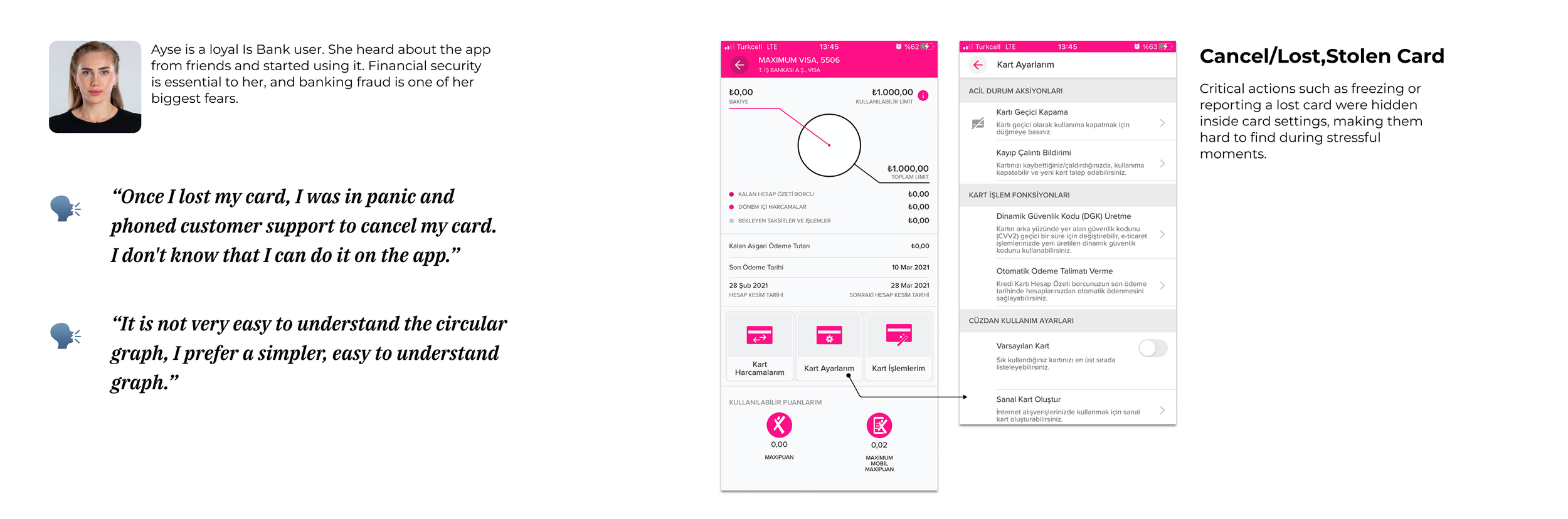
Friction
Opportunity
Make critical card actions faster to reach and reduce dependency on customer support.
Together, these profiles helped us frame the redesign around two priorities: making product value easier to discover and making critical financial actions easier to access.
My Role
I led the end-to-end product design process from problem definition through implementation, working closely with a UX researcher and cross-functional teams across product, business, marketing, card payments, and engineering.
Strategic Direction
Connected user pain points with business priorities, shaping hypotheses around discoverability, card usage, service adoption, and emergency card access.
Experience Design
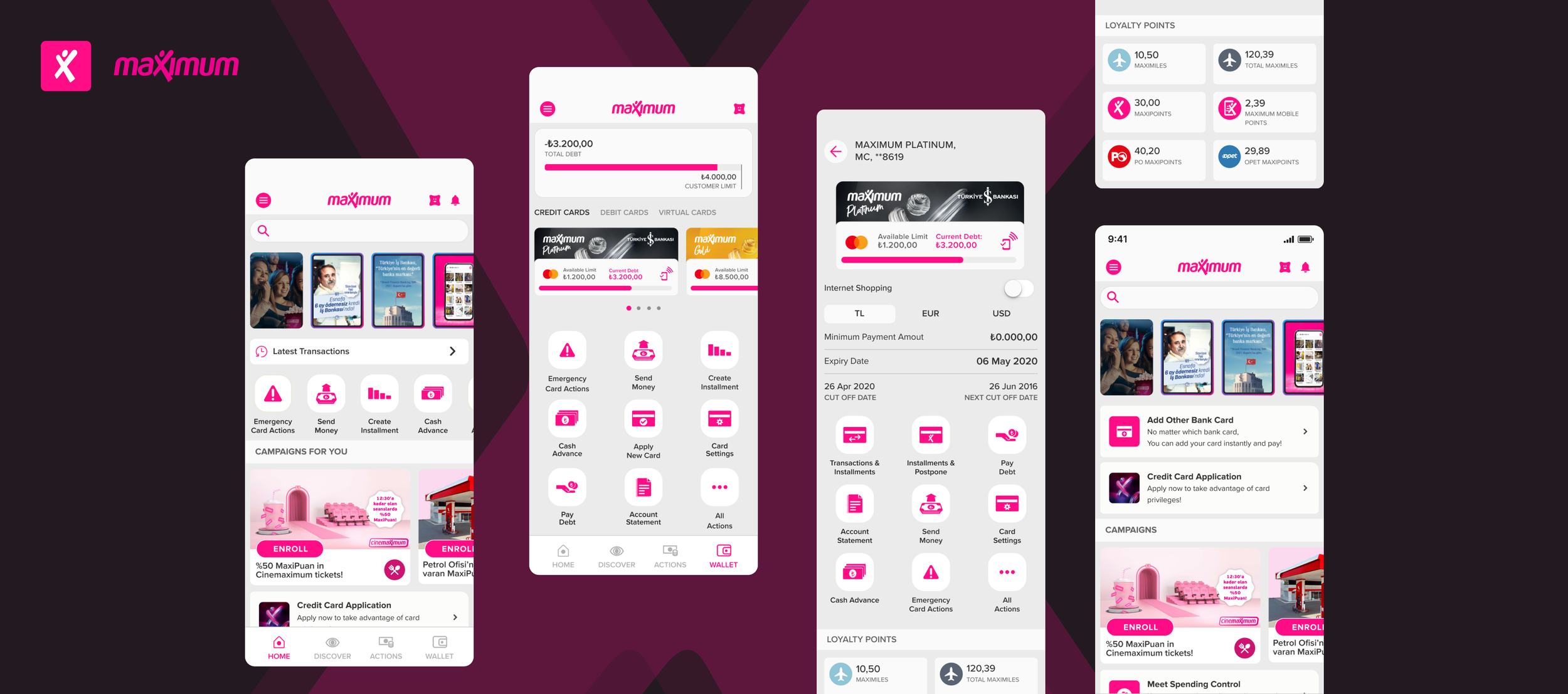
Redesigned Home, Wallet, and Card Details to make essential actions, financial information, and relevant services easier to find and use.
Research & Validation
Turned user interviews, CX reports, benchmarks, and usability findings into clear decisions across information architecture, quick actions, search, and card management flows.
Role
Lead Product Designer
Practices
Product Strategy, User Research, UX/UI Design, Prototyping
Product & UX Hypotheses
Based on stakeholder goals, user interviews, and CX feedback, we framed the redesign around one core challenge: users were struggling to discover and act on key product capabilities as the app became more feature-rich.
1. Discoverability Friction
Users could not easily find the services and card actions that already existed in the app.
2. Information Architecture Gap
As the product expanded, the existing structure was no longer strong enough to support campaigns, payments, wallet features, and financial services together.
3. Business Visibility Problem
Features that supported business goals, such as card applications, financial instruments, and card management actions, were hidden too deep in the experience.
We needed to redesign not only the interface, but the way users discover, understand, and act within the app.
Strategy — Organizing the Product Around User Intent
Maximum Mobil had become a feature-rich ecosystem, but users were not thinking in terms of product categories or internal business units. They came to the app with simple intentions: discover benefits, monitor their financial activity, and complete payments or card actions.
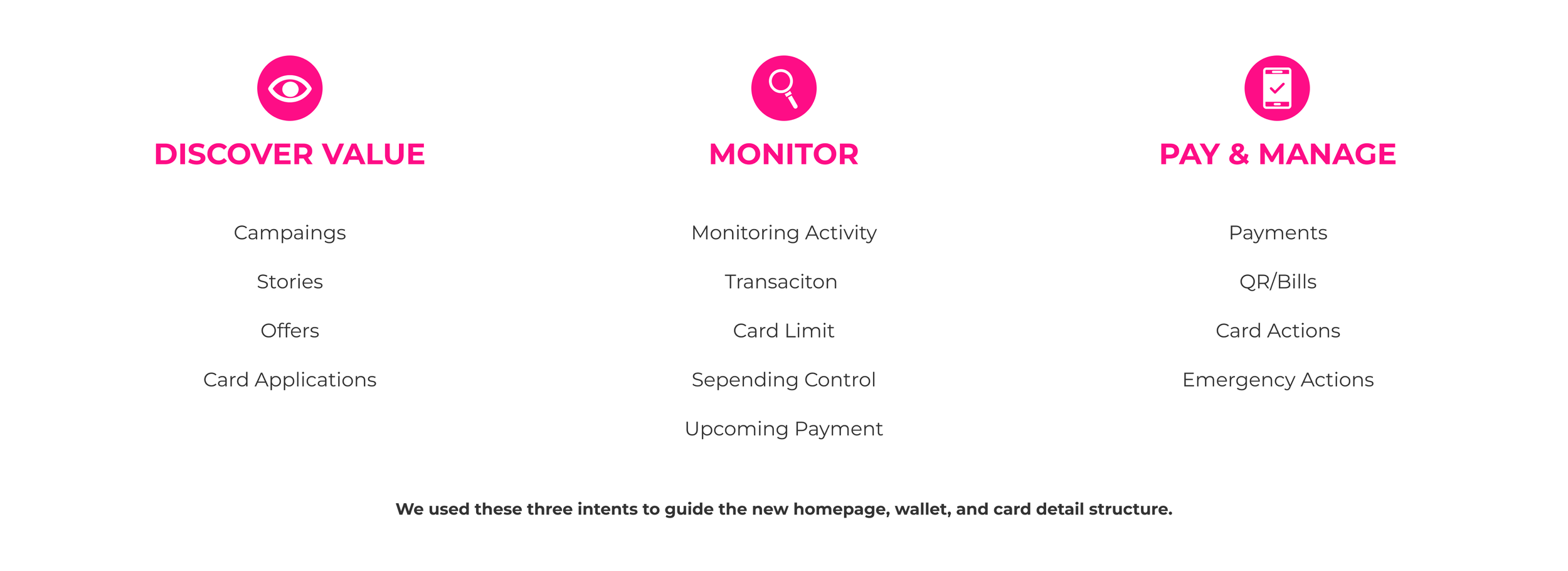
To simplify the experience, we reframed the product around three core user intents:
1. Discover Value
Users wanted to understand what Maximum Mobil offered, explore campaigns, and discover ecosystem benefits such as discounts, services, and card application opportunities.
Design direction:
Make campaigns, stories, personalized offers, and application touch-points more visible from the landing experience.
2. Monitor Financial Activity
Users needed quick reassurance about their financial status, including latest transactions, card limits, spending control, and upcoming payments.
Design direction:
Bring key financial information closer to the homepage and wallet experience, instead of hiding it in deeper layers.
Decision Inputs — Benchmarks & Early Explorations
Design Direction — Making the Home More Useful
3. Pay & Manage
Users needed to complete frequent actions such as payments, money transfers, card management, QR payments, and emergency card actions quickly.
Design direction:
Create faster paths to high-intent actions through search, shortcuts, quick actions, and clearer wallet/card detail structures.
This strategy helped us move from a feature-heavy structure to an intent-led experience, making the app easier to understand, navigate, and act within.
Before restructuring the experience, we analyzed fintech, wallet, and homepage patterns across local and global products. We also explored early wireframes for the home, wallet, and card detail pages to understand how key actions could become easier to find and compare.
These inputs helped us identify recurring patterns, reduce ambiguity, and shape the first design direction before moving into detailed flows.

Benchmarking revealed recurring patterns such as recent transactions, quick actions, campaigns, shortcuts, and card controls. We used these findings as decision inputs to shape a homepage that balanced user reassurance, fast access, feature discovery, and business visibility.
Information Architecture — Turning Complexity into Clear Paths
With a growing set of financial, shopping, and campaign-related features, the challenge was no longer just what to surface, but how to organize the product around clear user intentions.
We restructured the experience into distinct paths — Search, Home, Discover, Actions, and Wallet — giving each area a clearer role while reducing competition between features.
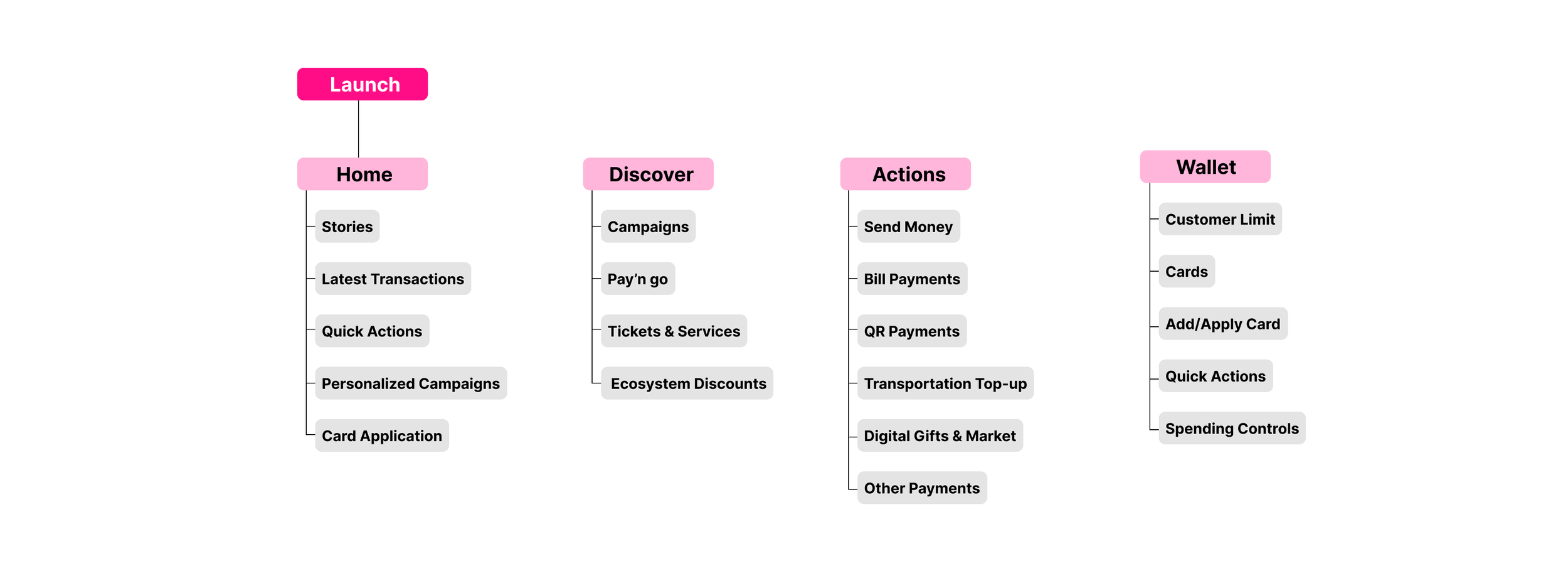
This structure helped separate everyday tasks from exploration and financial management, creating clearer entry points across the experience.
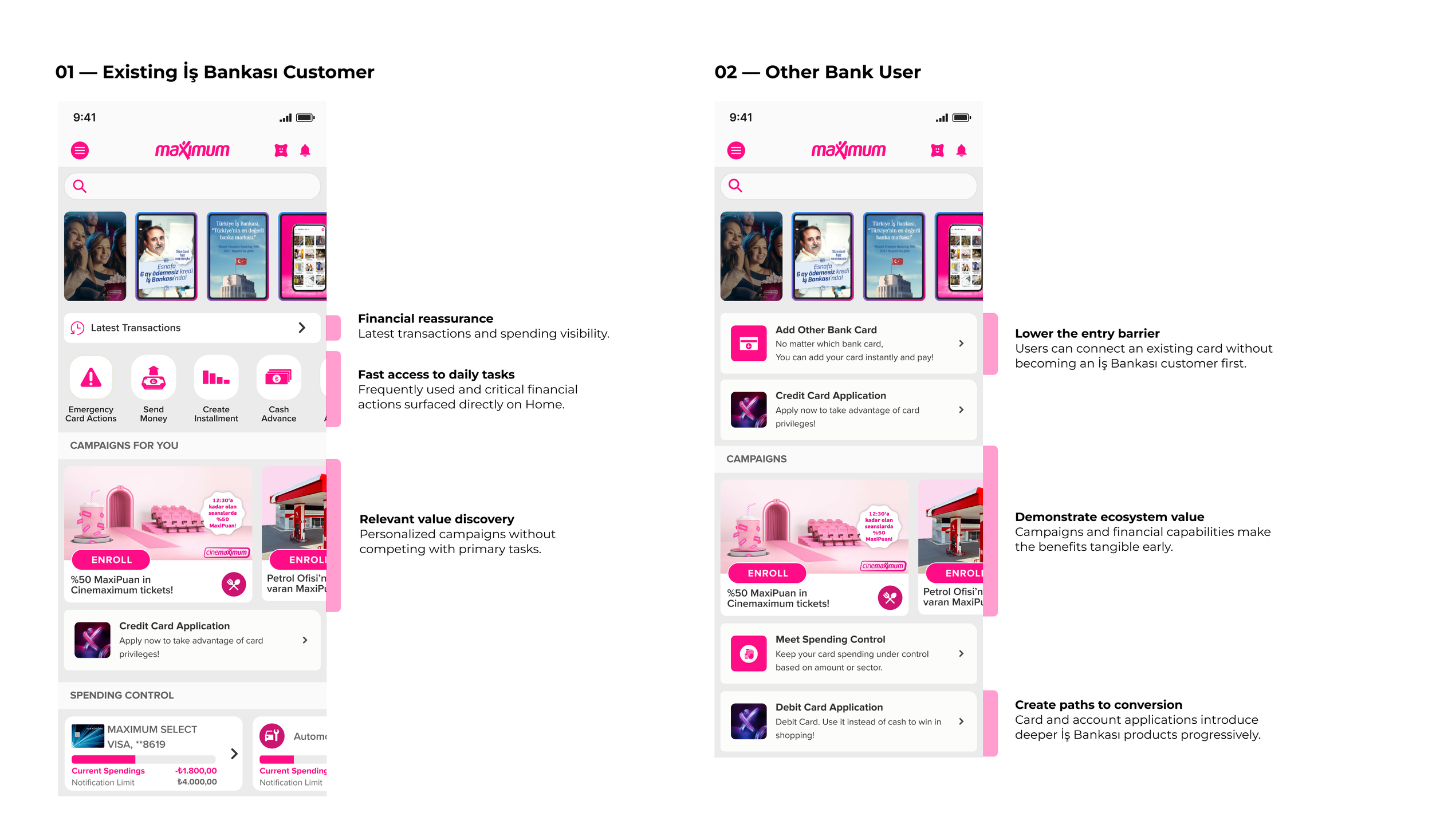
With the new structure in place, we redefined the homepage as more than a promotional surface. It needed to help users understand their current financial state, complete frequent tasks quickly, and discover relevant benefits without feeling overwhelmed.
We organized the experience around three priorities:
1. Reassure at a glance
Balance, recent activity, and card information gave users immediate visibility into their financial status.
2. Speed up frequent actions
High-frequency tasks such as payments, money transfers, and card actions were brought closer to the surface.
3. Create room for discovery
Campaigns, services, and personalized content remained visible, but were placed around—not in competition with—users’ primary tasks.
We tailored the homepage hierarchy to different user relationships with the ecosystem — prioritizing control for existing customers and activation for new ones.
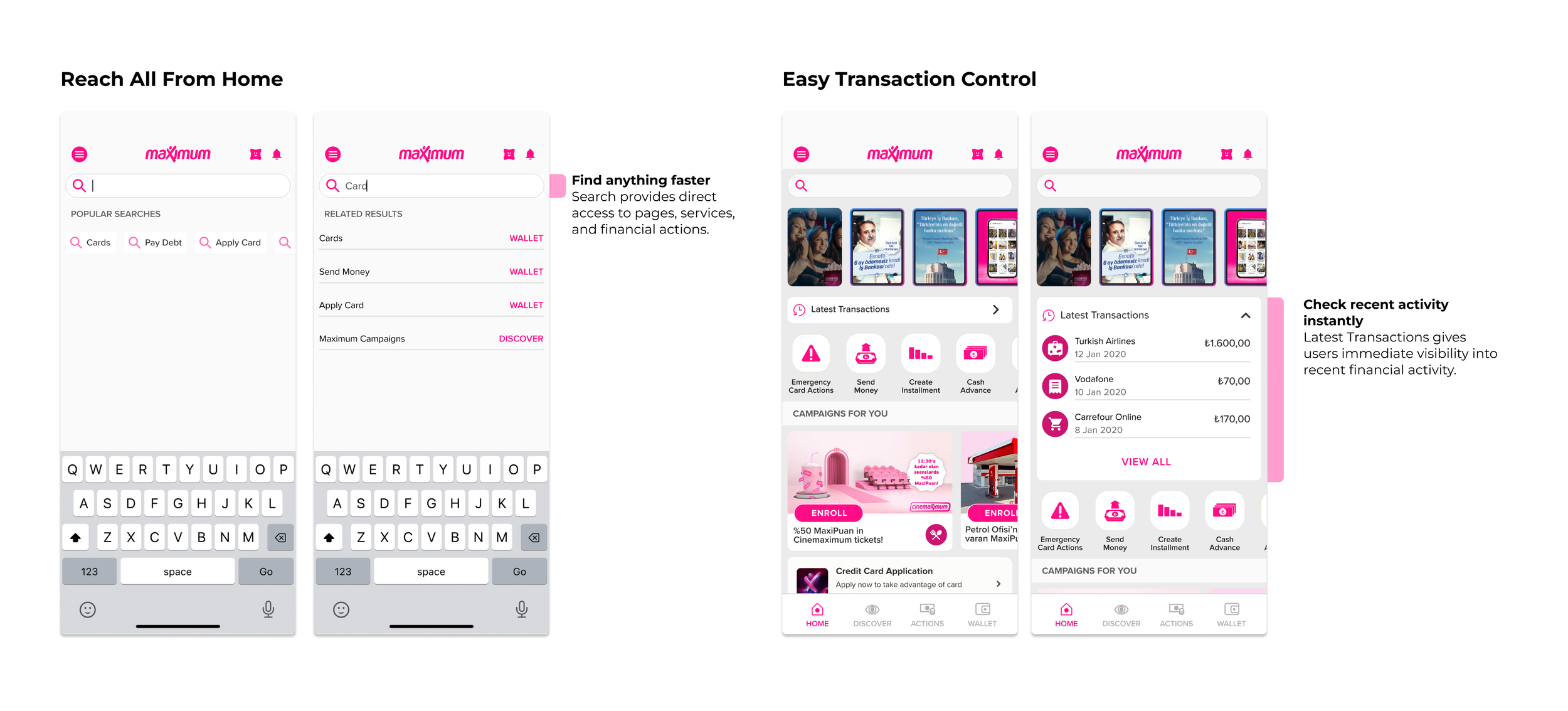
Making Key Tasks Easier to Reach
We brought high-frequency information and actions closer to the surface, reducing the need to navigate through deeper menus.
More Control When It Matters
We redesigned the Wallet and Card Detail experiences to give users a clearer view of their finances and bring card management into one accessible place. Critical actions—such as freezing a card—were made easier to find when speed and reassurance mattered most.
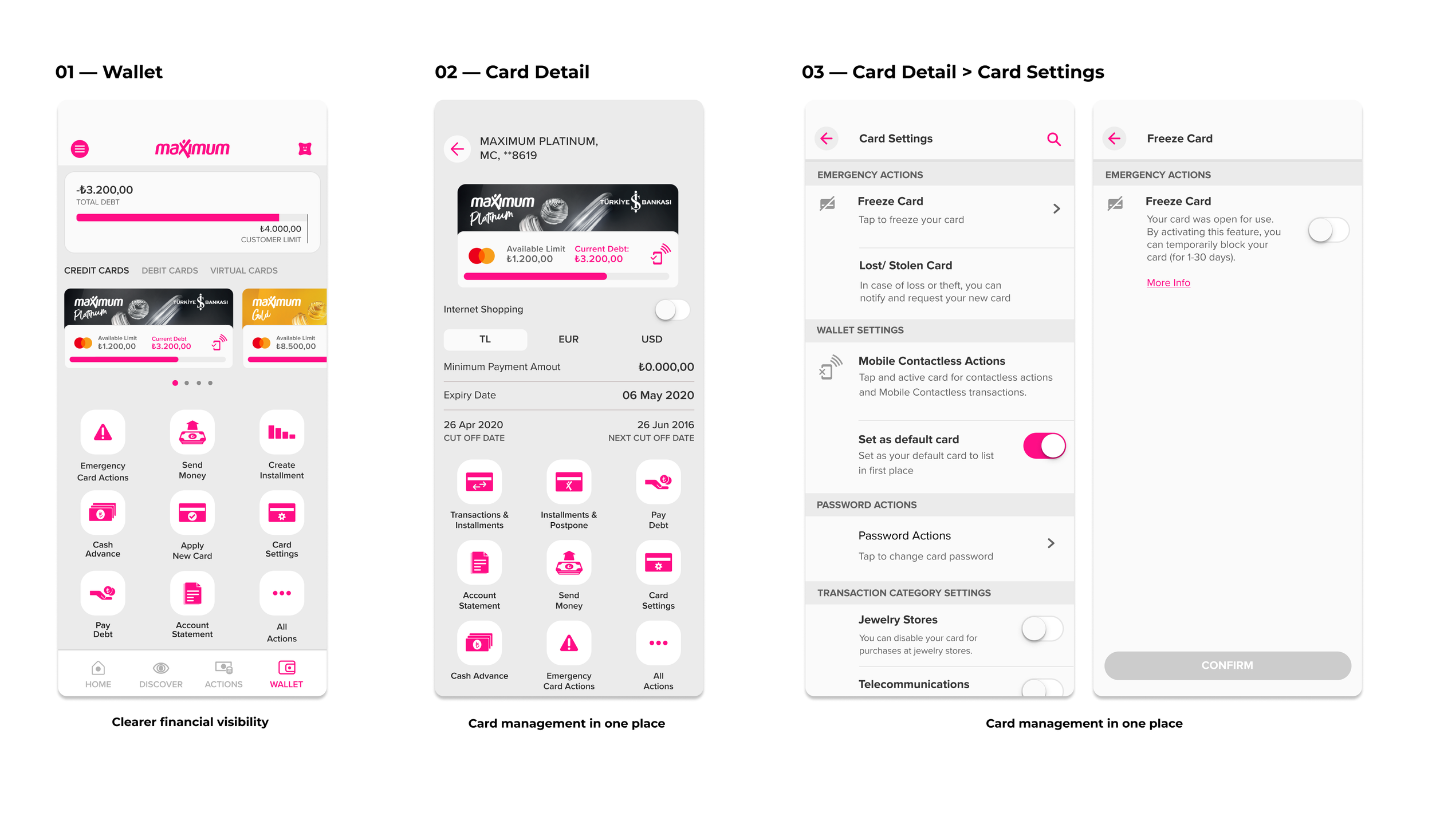
Creating Paths Into the Ecosystem
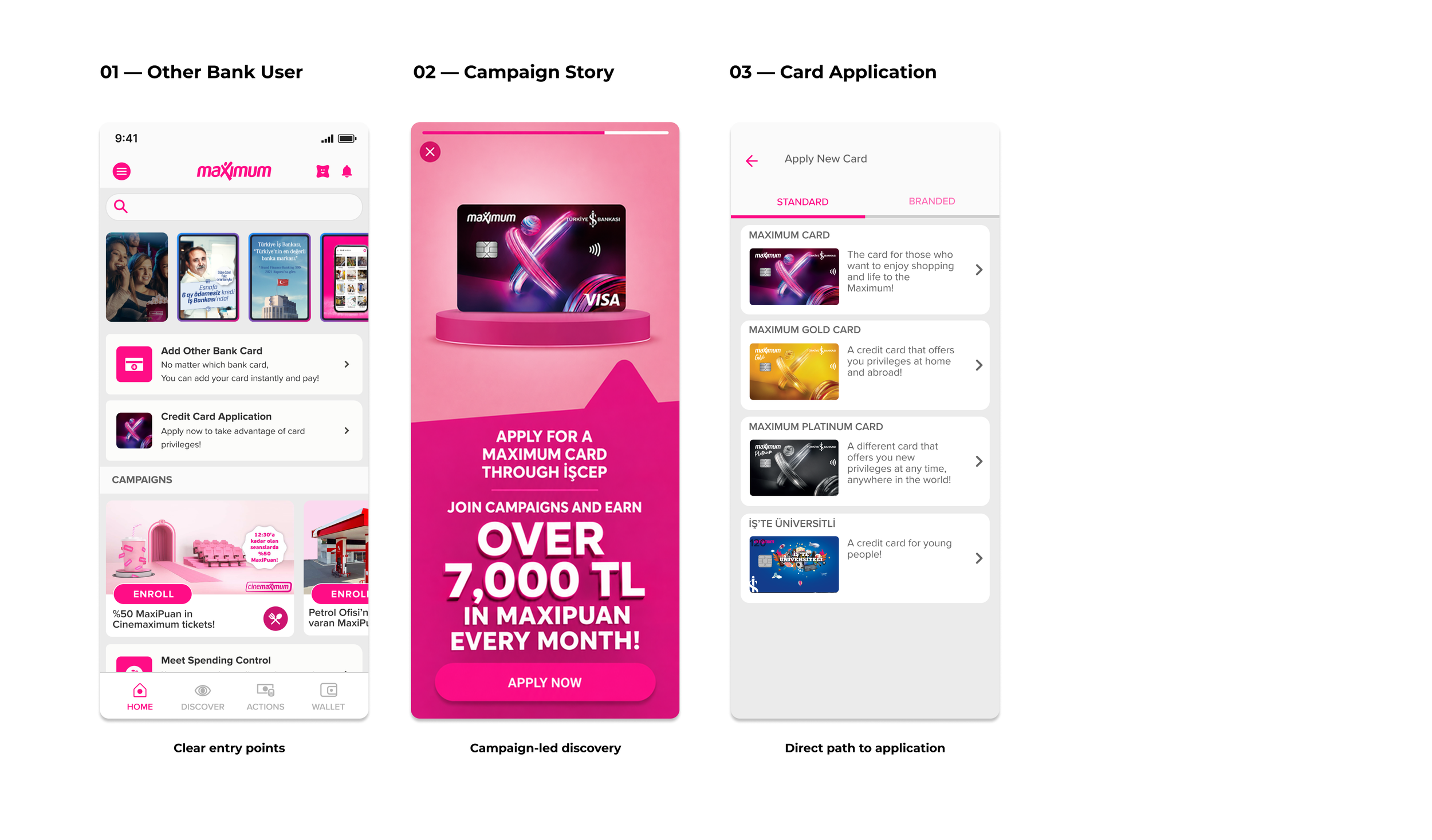
Maximum Mobil also needed to create value for users who did not yet have an İşbank card. We connected homepage entry points, campaign stories, and card application into one clear journey—helping users understand the benefit, explore the offer, and move directly from discovery to application.
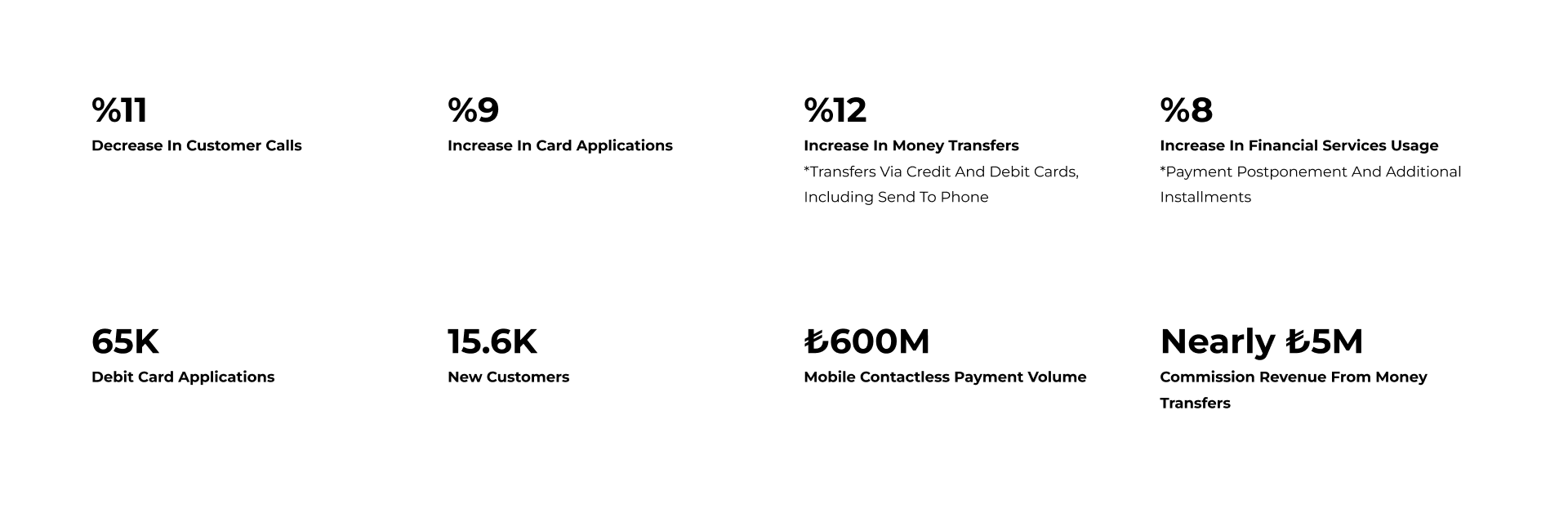
Impact
Following the redesign, key journeys showed improvements across support demand, product adoption, and transaction activity.